Privacy Tip #3: Block Referer Headers in Firefox
When you follow a link from one page or site to another, the browser usually sends a Referer [sic] header to the server to tell sites where you came from:
GET /test.phtml HTTP/1.1
Host: cafe.elharo.com
User-Agent: Mozilla/5.0 (Macintosh; U; PPC Mac OS X Mach-O; en-US; rv:1.8) Gecko/20051130 Firefox/1.5
Referer: http://blog.elharo.com/blog/
Accept: text/xml,application/xml,application/xhtml+xml,text/html;q=0.9,text/plain;q=0.8,image/png,*/*;q=0.5
Accept-Language: en-us,en;q=0.5
Accept-Encoding: gzip,deflate
Accept-Charset: ISO-8859-1,utf-8;q=0.7,*;q=0.7
Keep-Alive: 300
Connection: keep-alive
In general this is a good thing. However, unscrupulous sites can and do abuse this information to violate visitors’ privacy and track them across the Web. In combination with cookies, it’s especially dangerous. In Firefox, you can disable the sending of the Referer header completely, and in general I recommend you do so. Here are the steps:
- Type “about:config” in the location bar, and press return.
- In the filter box, type “referer” and press return. This should leave you with one preference,
network.http.sendRefererHeader. This is probably set to 2. - Right click on
network.http.sendRefererHeaderand select “Modify”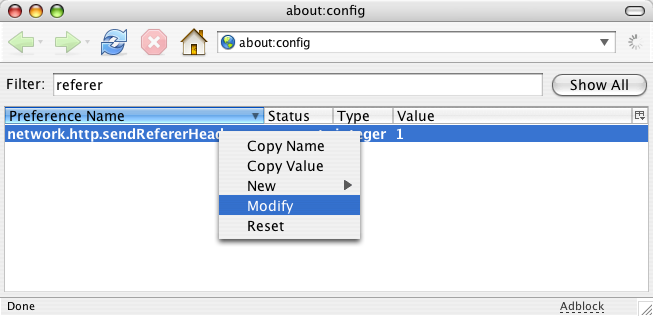
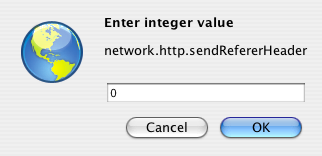
- In the dialog that appears type “0” and press OK:
- Close the window.
This completely disables the referer header. This is normally what you want, though it may occasionally break a few sites that check the referer header to prevent deep linking or framing of its content. (It breaks WordPress, for example.)
If you run into problems, try setting sendRefererHeader to 1 instead. Setting it to 1 sends a referer header when following a link to another page, but not when loading images on the page. This will block most cross-site cookie tracking, but still allow WordPress and most other sites that depend on referers to function. Setting sendRefererHeader to 2 (the default) sends it when following links and when loading images on the page.
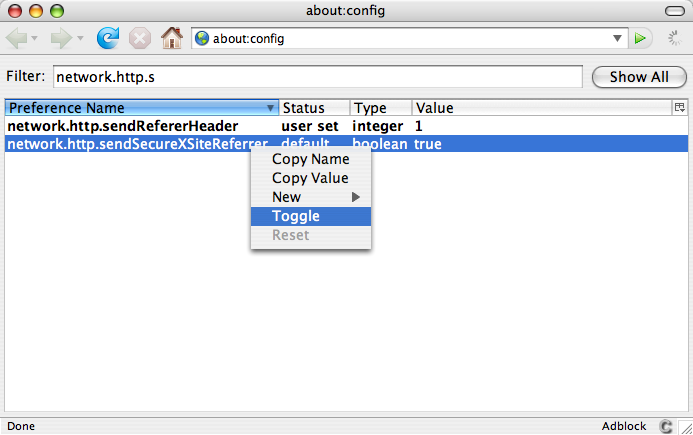
There’s also a boolean network.http.sendSecureXSiteReferer preference. If true, referer headers are sent for https the same as they are for http (i.e. controlled by network.http.sendRefererHeader). If false, referer headers are not sent for https connections. The default is true, and that’s probably OK; but if you like you can set this to false by toggling the value:
That’s it. You’re done. Taking these steps significantly reduces the ability of sites to track and profile you.
October 24th, 2006 at 8:24 am
Rather than blocking the Referer header for images, wouldn’t it be better to disable cookies on images?
Many sites check the Referer tag to prevent image hotlinking. I had the problem especially with MySpace and LiveJournal users hotlinking to my higher resolution photos, so I setup Apache mod_rewrite to “deter” it. Given the number of tutorials I found on the topic, I suspect its a popular technique.
October 23rd, 2007 at 7:52 am
Many sites use this value to check what page you were on so they can direct you to the next page – for example at the checkout. Worst case scenario – your card is charged and the software crashes expecting HTTP_REFERRER to be set so you never get your order.
All HTTP_REFERRER does is transmit the url of the page you came from. I hardly call that tracking you ‘across the Web’ as the author claims. The MOST it will reveal about your browsing activities to the website owner is the url of the last page you visited before you entered their site (i.e. the url of the page with the link to their site on it) or the URL of pages deep link to their content.
There is such a thing as too much paranoia………
January 6th, 2008 at 12:39 am
There’s also such a thing as wanting to suppress information, even if you personally don’t see the point. I use logins with URL’s, I don’t really know if those’re carried over, or the path to admin folders that may not be properly configured.
Perhaps someone visits a site they don’t necessarily want everyone to know, is it relevant to every site I visit that I was just at rapesurvivors.net or how about gay.com? Should that be set as a cookie or just logged along with my IP address on the server to build a browsing history retrievable in seconds from the logs? Then if the site also has registration, you can just tie the registration info to the IP and that to the history.
I believe it’s required for cafepress sites among others, so you can force this. Just because YOU wouldn’t use it for social manipulation or harassment, that doesn’t mean you represent everyone.
April 10th, 2008 at 11:13 am
Remember also, that referer information is ONLY passed through clicking a link! That’s right, you can copy the URL to the address bar and the next site will not know where you came from. Neither does it work if you type any address on the address bar.
April 10th, 2008 at 12:49 pm
[…] Source: The Cafes. […]
June 8th, 2008 at 11:19 am
so next time I go shopping at Target, I’ll go to the manager and tell him – hay I just came from walmart.
June 14th, 2008 at 3:40 pm
@bloogie: In a real life sense, this would only make sense if Walmart had actually told you to go to Target. It does make sense in real life in some occasions, even if it is not really necessary (the same thing as here).
For instance, I need to book a hotel. I go to Days Inn and they tell me that they are out of rooms, but Holiday Inn has a room for me. I go to Holiday Room and told them that Days Inn just sent me here and I would like a room. While not necessary per se, it just makes sense.
Your example would not be how a referer works. A referer only happens in server logs when you click a link to go from one website to another. If I type in http://yahoo.com/ and then http://google.com/, Google would not know I got to their website after visiting Yahoo!. But if I clicked a link at http://yahoo.com/ to go to http://google.com, Google would know I got to their site via Yahoo!.
July 18th, 2008 at 6:26 pm
Is there a way to configure a link on my site to block the referer header – for instance, if I manage gay.com and have links to homophobia.com on my site – could I protect the privacy of my visitors?
October 8th, 2008 at 3:51 pm
@Jason:
Yes, prefix the url with http://www.de-referer.com/?, thus the link would become:
http://www.de-referer.com/?http://de-referer.com/homophobia.com
October 18th, 2008 at 9:14 am
Does anybody know wether Firefox sends the referrer when you open a link in a new tab by right-clicking and selecting “open in new tab”?
July 16th, 2009 at 11:18 pm
This does not work. about.config goes to a page 504 Connect to about.config:80 failed: SOCKS error: host unreachable
The following error occurred while trying to access http://about.config/:
504 Connect to about.config:80 failed: SOCKS error: host unreachable
Generated Thu, 16 Jul 2009 21:16:42 Pacific Daylight Time by Polipo on localhost:8118.
July 17th, 2009 at 9:38 am
Dave. You typed “about.config” instead of “about:config”. Change the period to a colon.
October 21st, 2009 at 8:43 am
[…] you can disable the sending of the HTTP referrer to the websites you visit. While it is possible to disable the HTTP referrer entirely in Firefox’s about:config, this can break certain […]
October 22nd, 2009 at 1:40 pm
[…] you can disable the sending of the HTTP referrer to the websites you visit. While it is possible to disable the HTTP referrer entirely in Firefox’s about:config, this can break certain […]
December 28th, 2009 at 2:12 am
[…] some information about the different sendRefererHeader settings in the Firefox about:config from The Cafes that helps explain what’s going on here. Setting it to 1 sends a referer header when […]
January 19th, 2010 at 4:02 am
Anything that can be done to stop website ops tracking and abusing information is a good thing. One particular blogger named Waldo Jaquith, who considers himself the bee’s knees in all things internetty, blogged that a certain political adversary who visited his site had arrived via an embarrassing adult website. He based this claim on the x-referrer information that most people tend to ignore and posted it in an attempt to embarrass the gentleman into silence. Since the x-referrer was believed to be bulletproof at the time, Waldo thought it was rock-solid and gleefully announced the info to his many adoring groupies with the result being that the guy’s reputation was sullied without a chance of rebuttal.
The bottom line is that anyone who says it’s not necessary to worry about needing to hide the referrer and taking other precautions against abuse is kidding themselves.
April 2nd, 2010 at 7:32 am
Thanks for this post. I’m having problems though.
I have no idea how, but my Firefox is now set to 0; I’ve never opened this before. Following these instructions, and changing to default 2 or 1 doesn’t help. The setting automatically changes back to 0. Anyone know what’s happening? I need to set it at least 1, for a site on which I’m working, the forum requires that the referer headers to be enabled; there are already errors in the forum online because of this.
I’m working on a Mac, with Firefox 3.6.2; Safari 4.0.5 doesn’t seem to cause a problem since the referer seems to be enabled.
Any help would be appreciated. TIA
June 22nd, 2010 at 3:03 pm
“Since the x-referrer was believed to be bulletproof at the time”
The x-referrer header is for XMLHttpRequest NOT hyper-links, can be set to ANY value, and XMLHttpRequest can only access the SAME site.
So:
– there is no way he could jump from site A to site B with a “x-referrer”
– x-referrer can be set to any value by calling code, proves NOTHING
– the porn site and the political site would have to be the SAME SITE
So your story is simply preposterous. It is CLEARLY made-up.
Also, there is NO WAY the political opponent would be identified. AND OBVIOUSLY PORN SITES “USUALLY” DO NOT HAVE LINKS TO POLITICAL SITES.
Not only your fairytale story goes is TECHNICALLY IMPOSSIBLE, it goes against COMMON SENS.
Please don’t become yet another lame film fiction writer. The world has enough of these.
Thank you.
July 25th, 2010 at 9:23 pm
[…] off referers on Firefox, go to about:config and change network.http.sendRefererHeader to 0. See https://cafe.elharo.com/privacy/privacy-tip-3-block-referer-headers-in-firefox/ for more […]
August 20th, 2010 at 12:56 am
Thanks for that I was wondering how to turn that off in firefox. Sites don’t need to see what page I just came from.
September 30th, 2010 at 11:28 pm
so de-referrer knows where you’ve been…
btw, wordpress’s referrer lockout seems to be for wp admin only, not wp visitors. and, presumably you could fake referrer for that.
November 22nd, 2010 at 5:07 am
[…] followed instructions on the following blog post https://cafe.elharo.com/privacy/privacy-tip-3-block-referer-headers-in-firefox/ to configure my Firefox instance to not send the “referer […]
December 3rd, 2010 at 10:26 am
Ideally firefox should be configurable such that referrer could be disabled for cross-domain conditions, but allowed for same-domain. Presumably this would not break wordpress and the like, while at the same time offering more privacy than the default situation.
June 7th, 2011 at 11:18 am
Since this was the first result in my search for dealing with referers in Firefox, I though I’d add a link to the RefControl extension, which allows one to control which sites get referer headers and which don’t.
This was quite useful for me when a site I was using wouldn’t work without referers. I was able to block them for all other sites, while allowing them just for that one.
April 14th, 2012 at 8:37 am
[…] Block Referer Headers in Firefox […]
July 16th, 2012 at 3:58 pm
he does say it for everyone thats why hes on the intenret, he s a liar
July 16th, 2012 at 3:59 pm
and everybody does it, hes just trying to get you rinfo
August 30th, 2012 at 12:34 am
>>should be configurable such that referrer could be disabled for cross-domain conditions, but allowed for same-domain. Presumably this would not break wordpress and the like
Proxomitron does that, but larger sites use different domains for images, css, javascript files. To fix that, you can manually set a fake referer = web page domain for the image domain. I set a fake referer = yahoo domain for yimg. I also set a fake referer for s__999__n_o_999__p_e_s and for ex__999__p_e_rts-e_xc__ha_999_n_ge (ignore underscores and 999)
If you rarely visit the site, then temporarily disable Proxomitron referer filter.
>>Does anybody know whether Firefox sends the referrer when you open a link in a new tab by right-clicking and selecting “open in new tab”?
As I recall, open in new tab does send referrer url. You can see this by right click in browser page, “View Page Info”. The 6th line down is “Referring URL”. Even if using Proxomitron, “Page Info” will indicate that Firefox sends referrer, but Proxomitron intercepts the referrer after it leaves your browser.
BTW, I’ve never noticed wordpress block wordpress images. I searched through my files, and see I haven’t done anything special for wordpress referers.
>>>RefControl extension
And extensions for limited purposes are easier to use. I’ve never used this or extensions for similar purposes because I’ve already been using Proxomitron (developed for Win98, Win2000, but runs on Win95 through Vista. Should run in Win7. Also runs in WINE. Try Winebottler for OS X. A search of the web doesn’t find anyone reporting about Proxomitron in Win8.)
Turn off DOM Storage (“ever cookies”)
August 30th, 2012 at 12:37 am
ME: >>”You can see this by right click in browser page, “View Page Info”. ”
I should have said that you check “Referring URL” in “Page Info” of the “new tab” tab.
August 15th, 2013 at 2:26 am
[…] https://cafe.elharo.com/privacy/privacy-tip-3-block-referer-headers-in-firefox/ […]
September 26th, 2013 at 12:14 am
The average user unfortunately is taught almost nothing about security. The amount of fraud and blackmail perpetrated against the public my employees are confronted with each day is staggering. We are often called in by law enforcement bodies to track down fishers, defrauders and other such scammongerers to recover the victims assets and bring perps to “justice”.
What can be done from the address bar with a little “know-how”, plus scripting, 3rd party and handwritten customized tools would stagger the average inexperienced internet user. Any information can be used to destroy the lives of innocent victims when used in conjunction with “email fishing”, “man-in-the browser/middle” and “social engineering” and publicly available information. The only secure computer is one riddled with bullet holes. We use our old HDD/SDD for target practice at the range.
October 21st, 2015 at 10:03 am
[…] network.http.sendRefererHeader (default=2) ??Referer??????0???????1?????????????????????????????2????????Privacy Tip #3: Block Referer Headers in Firefox […]