Interaction Blooper #1: Waiting for the User
Long-running operations that require occasional user input should nonetheless not block while waiting for it. They need to accomplish as much as they can as quickly as they can. If necessary the problem should be divided into the pieces that require user input and pieces that don’t so that progress can be made on some pieces while waiting for input on other pieces. This was recently brought home to me while evaluating the ChronoSync file synchronization tool.
ChronoSync can backup, mirror, or synchronize entire disks. This can involve transferring hundreds of thousands of files and gigabytes of data over a slow network. This can easily take hours to a day or more. Needless to say the user isn’t going to sit in front of their computer twiddling their thumbs during the entire operation. Consequently, you can imagine how disappointing it is to leave a computer backing up overnight, only to return to it the next morning and discover it’s copied two files while presenting you with a dialog like this:
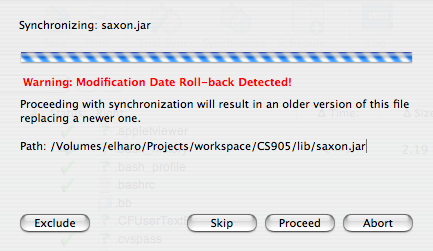
Putting up such a dialog is not the mistake. It is OK for a program to request user input. Certainly, ChronoSync should not overwrite a changed file and potentially lose data without alerting the user. Certainly, ChronoSync should alert the user of files it could not copy. The mistake is that ChronoSync stops all other operations and waits for the user to answer this question before proceeding to copy the files that don’t require user confirmation. Typically less than 1 file in 1000 needs to be confirmed (or denied). There is no good reason not to copy the 999 files that don’t need to be confirmed while waiting for further input on the one file that does.
What ChronoSync and similar programs should do is add the questionable operation to a secondary queue. Any operation that requires confirmation goes in the queue, and waits there until the user approves or rejects it. However all the operations that don’t require user approval can continue. That way when the user wakes up the next morning, most of the files have been copied. They just have to decide what to do about the few that require manual intervention, and the process is complete.
If you need an outside eye to spot user interaction bloopers like this one, I’m available for consulting and expert design reviews. I specialize in end-user facing software and programmer-facing APIs, but I’ve been known to help out with devices like cameras, refrigerators, microwaves, and watches from time to time too.
August 15th, 2006 at 8:08 am
Amen!
Architecturally, this is often easy to do when you set out to write process-intensive applications. Such applications are often written using the command pattern. Commands (such as copy one file) are generated in a supervisor thread and placed in a queue. Worker threads take commands out of the queue and attempt to execute them. Results can be placed in a queue back to the supervisor, which can report successes and failures asynchronously.
This solves the UI problem you describe as well as dealing with situations where there are multiple resources that have different performance characteristics. If you are copying some files to a local drive, some to a network drive, and some to an FTP server, the application should be able to copy all of the local files while the copy to the FTP server is taking place. The overall performance will be faster than using a single thread.
August 16th, 2006 at 7:56 am
[…] « Interaction Blooper #1: Waiting for the User […]
August 17th, 2006 at 9:15 am
I couldn’t agree more…
I still have Mozilla 1.7 on my old Win98SE computer and I hate when it asks if it should compress folders, stopping the downloading of new messages until I answer…
Then it says it cannot download messages while compressing folders…
BTW, I wonder why you use a bold font for your posts, and such big fonts in the whole page.
September 7th, 2006 at 1:47 pm
[…] After evaluating Chronosync for a month, the evaluation period is up and it’s time to make a decision. To buy or not to buy, that is the question. I think the answer is no. Chronosync is too slow and too complex to justify paying for. […]
July 29th, 2007 at 1:02 pm
I’ve been evaluating ChronoSync as well because of an online review. According to the features I found in the program and on the company’s website, it’s a great solution—but in reality, it’s actually pretty bad. I have a gigabit ethernet network with a storage-attached 1.5Tb drive and am backing up many gigabytes of data to it. I got up this morning expecting my first sync to be completed, and it was only 25% of the way through step 1 of 5 (about 3% overall) of a 420Gb backup. If I’d done this just dragging folders in the Finder, it would have completed this operation in about 17 hours. At the rate ChronoSync is running, about 1% of my network’s normal speed, it will take about 71 days. No thank you. Goodbye, ChronoSync!
January 18th, 2013 at 11:41 am
(posted on another forum so I cannot take credit..but since this is the forum that shows up when searching Google )
Here’s the skinny on Date Roll Back Errors:
ChronoSync keeps track of all your file info inside the sync document so it knows exactly what has changed since the last sync. A date roll back means that the file has changed since the last sync but now has an older modification date. Since new files should have a newer date it does not replace the file but gives you an error. If you are running a scheduled sync you will get errors posted to the log but if you are running a manual sync a window will come up with several options. By clicking on the “Proceed” button you can use the new file with the older date. It is recommend you try and determine why this is happening first before copying over any files.
To track down the files you can get a list of the files and errors in the Sync Document Log.
To handle Date Roll-back Errors before they occur you can use the Options Panel of your sync document and set the ‘Roll-backs’ popup menu to pre-select how you want this type of error handled in future syncs.
To correct the problem with this sync document, just Launch ChronoSync and open the troubled sync document. Click ‘Synchronize’ in the document toolbar to run the sync. When the date roll-back error is encountered, make your selection on the error window and ‘Proceed’ to resolve the error. Future syncs won’t report the error unless the date ‘rolls-back’ again in the future .